


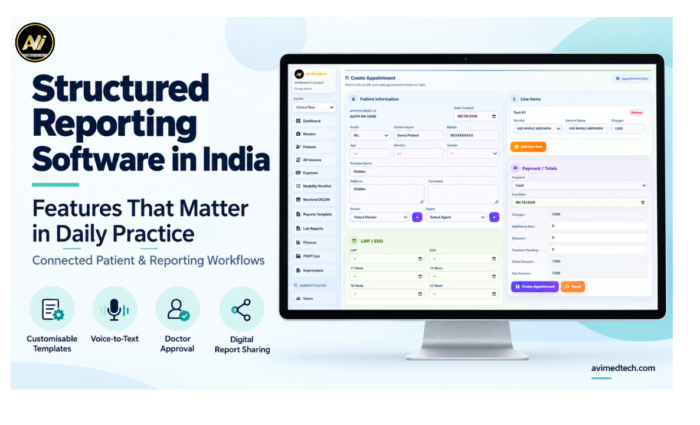
When selecting structured reporting software in India you should first consider what your team actually need on a typical working day. Is it possible for doctors to prepare their reports without having to type the same information over and over again? Can the staff quickly locate the correct patient record? And can your centre keep track of the reports that still require reviewing?
The importance of these questions lies in the fact that reporting entails much more than just preparing a document; patient registration, the examination details, the findings, the images, approval and delivery all play a part in the final workflow.
At AVI MedTech our aim is to assist diagnostic centres in organising these connected activities; our method incorporates structured reporting, patient information and daily operations into a more manageable workflow.
The article outlines the features that are worth assessing and the way in which they can assist with everyday reporting practice.
What counts as structured reporting software?
Structured reporting software helps doctors prepare reports using organised templates and consistent sections. Depending on the examination, doctors can include clinical history, technique, measurements, findings and impression.
Rather than beginning with a blank document each time, the doctor can choose a suitable format and input the information relating to the patient.
A good system strikes a balance between consistency and flexibility; it offers a clear structure at the same time as permitting doctors to alter the wording, make additions, and provide explanations for any unusual findings.
The SR reporting software mentioned in this article is the software employed in the preparation of structured clinical reports. Should your centre have a requirement for DICOM Structured Reporting interoperability, you should make sure to mention this specific need when the demonstration is being carried out.
Why Daily Workflow Should Guide Your Software Choice
A reporting system may look impressive during a demonstration, but your team discovers its practical value through everyday use.
When a patient returns for a follow-up appointment, the receptionist finds the correct record, and the doctor reviews the previous report and relevant images. After approval, the team sends the completed report to the intended recipient.
If the steps involve separate files or require repeated manual entry, then the staff have to spend more time coordinating the process.
When assessing structured reporting software in India, consider how well the system handles the entire process. A template library is useful, but you should also evaluate the complete workflow.
Essential Features of Structured Reporting Software in India
Customisable Report Templates
Quick Findings & Impression Shortcuts
Voice-to-Text Reporting
Patient History & Previous-Report Comparison
Image Upload & Attachments
DICOM Workflow & Integration
Report Status & Workflow Tracking
Doctor Review & Authorisation
WhatsApp, Email & QR Report Sharing
Patient Registration, Appointments & Billing
Role-Based Access & Data Protection
Operational & Financial Dashboards
1. Templates that can be customised to match the doctor’s reporting style
Reusable templates give doctors a starting point for routine examinations. They help organise report sections and reduce repetitive formatting.
Doctors should likewise have the ability to adjust the content to the individual case.
Look for options to:
- Modify the findings and the impression text.
- Include appropriate headings and make observations.
- Save report formats that are frequently used.
- Alter the phrasing to match the doctor’s preferences.
- Ensure that the completed reports have an organised layout.
For instance, a routine examination and a complicated follow-up case might need different levels of detail. The software must enable the doctor to record both of these clearly.
At AVI MedTech, having adjustable reporting formats is an important element in supporting individual clinical workflows.
2. The main findings and phrases that can be reused for reporting
It is common for doctors to use the same phrases when carrying out their daily documentation, and each time they enter these phrases it results in unnecessary typing.
Shortcuts for quick findings, saving text and impressions, can assist doctors in inserting commonly used material and then adapting it.
Doctors can edit the inserted text and use saved phrases as a starting point. They should review and adjust each phrase to reflect the actual findings.
When giving a demonstration, find out how users create, arrange and update these shortcuts, and also verify if different doctors can keep the wording that they prefer.
3. Easy editing of voice-to-text reporting
There is also the option of using voice-to-text reporting to input the findings, since the doctors can dictate the content of the report and then look at the text on the screen.
When you are comparing different systems, you should test the feature using normal operating conditions and realistic language. Make sure it is easy for the doctor to correct words, alter the punctuation, and switch between sections.
A practical demonstration should answer three questions:
- Does dictation match the doctor’s normal method of preparing reports?
- Will the resulting text be easy to edit?
- Will the final report be easy to review prior to approval?
Doctors must carefully check names, measurements, units and clinical terms. Voice-assisted documentation helps them prepare reports, but they remain responsible for the final content.
4. A comparison with the patient’s previous history and reports
The need for follow-up reports usually involves having access to earlier information.
Doctors may need to review previous findings, measurements or impressions before documenting the current examination. The software should help them find the patient’s history easily during reporting.
Useful features are the ability to search for patient records, open earlier reports and identify the relevant examination date.
For example, a patient who is coming back for treatment might have a number of reports in the system; proper organisation of the records enables the doctor to choose the right earlier study for comparison.
When a medical centre deals with patients who make return visits, it is important to take this factor into account when selecting radiology reporting software.
5. Uploading images and attaching reports
Images that are relevant and the supporting documents help to keep the examination information together.
Find a simple method for uploading files, link them to the right patient, and include the chosen images in the report when necessary.
Make sure you also look at the preview of the final report. The images should still be clear, in the right position, and legible after exporting or printing.
AVI MedTech provides the facility to upload and manage medical images as part of its reporting process. When centres have further imaging needs, they should go over the file types required and the extent of integration during the demonstration.
6. The requirements concerning DICOM workflow and integration
If your centre uses DICOM studies, find out how the system links them to patient records and the reporting workflow.
Important questions include:
- What is the method by which the system gets access to a study?
- How do the patient demographics get matched?
- Shall the doctor be able to access the relevant images when he or she is preparing the report?
- What modalities and existing systems are available?
- What kind of configuration or integration work is needed?
The ability to attach images, the use of a DICOM viewer, connection to a PACS and DICOM Structured Reporting are all separate features; decide which functions your centre requires and request to see them in operation.
This practical discussion on integrating structured reporting software in India is particularly useful when it comes to replacing or connecting up existing systems.
7. A clear report on the status and work tracking
It is necessary for staff to know which reports are ready and which ones still require their attention.
Inquire of the software as to whether it can display the reporting stages that your centre employs, for example preparation, review, authorisation and delivery; the status names available and the permissions should correspond with the agreed configuration.
Distinguish between workflow status and clinical priority. “Awaiting approval” shows the report’s progress, while “critical” indicates a clinical flag.
Having clear tracking enables the reception and reporting staff to deal with patient enquiries and to spot the tasks that require follow-up.
8. Reviews and authorisation controlled by the doctor
The doctor must review the report before releasing it.
Find a workflow which enables the authorized doctor to review the patient’s details, the findings, the measurements, the impression and the attached images before finalising them.
It is also useful to clarify:
- Who is capable of preparing or editing a draft?
- Whom is it possible to authorize to approve the report?
- What is the procedure for applying the doctor’s signature?
- What would occur if it was necessary to correct a final report?
As part of its reporting service, AVI MedTech has doctor-controlled review and authorisation of reports. The doctor is responsible for the clinical interpretation and for the final approval.
9. Digital Report Sharing
Finished reports should be given to patients and to the referring clinicians via a practical method of delivery.
Digital report sharing can be supported through the use of WhatsApp, email, and QR-based access, according to the settings configured.
Prior to selecting a system, it is necessary to examine the real journey of the recipient. This involves looking at what the recipient gets, the way in which they access the report, and the controls that are in place.
Before releasing any patient information, staff members should check the recipient’s details and adhere to the centre’s permissions and consent procedure.
The objective is to provide convenience in delivery yet at the same time keep proper control over access.
10. Registration, appointments and billing linked together
The teams responsible for reporting rely on accurate administrative information.
When the system links registration, examination selection and billing to the report record, staff can reduce repeated data entry.
When carrying out the demonstration, go through a realistic scenario from registration all the way to the delivery of the report and verify how the system deals with a returning patient, an extra examination, or a change to the demographic details.
AVI MedTech combines reporting with patient management, appointment scheduling and billing; the modules listed should be verified in the accepted proposal.
11. Access and Data Protection Based on Role
Various members of the team require different levels of permission.
It may be necessary for receptionists to have access to registration and billing systems, while doctors will require access to reporting and approval facilities. Administrators might also need to have operational supervision and user management capabilities.
When you are evaluating structured reporting software in India, you should consider how the system manages access for each role.
Also look at the suggested backup arrangement and make sure that the schedule, storage location, retention period, responsibility for monitoring and the restoration procedure are confirmed.
The details must be included in the discussion on implementation so that the centre can understand how its records will be handled.
12. Dashboards to Help Teams Take Action
An effective dashboard enables staff to determine what requires their attention.
Depending on the available modules, dashboards can display examination volumes, reporting activity, pending work, collections and outstanding payments.
For instance, a centre manager might wish to spot an increasing number of reviews in the backlog. There will be a need for reception to have a rapid overview of the reports that are ready for delivery.
Inquire if the dashboard clearly answers these common questions; just because there are more charts doesn’t mean that the visibility is improved.
How to Evaluate Structured Reporting Software in India
A guided demo works best when it follows your actual process.
Prepare a few anonymised examples before the session:
1. A standard template examination.
2. A follow up case requiring an earlier report.
3. A report that requires images and further findings.
4. A draft requiring correction prior to approval.
5. A report to be completed and shared electronically.
Ask the vendor to walk you through each step. Have the people who will be using the software look at the screens, the editing and the navigation.
Also confirm the commercial scope. Look at user limits, locations, supported exams, customisation, integrations, hosting, training and the cost of ongoing support.
A clear proposal will enable your centre to see exactly what functions are available and what services are included.
How AVI MedTech Supports Daily Reporting Practice
At AVI MedTech we bring together the tools that support report preparation and the activities around it.
Our reporting offering includes customisable templates, voice assisted documentation, quick findings and impression selection, access to previous reports, image management and doctor controlled approval.
Connected administrative functions can also be used to support patient management, appointments, billing and the delivery of digital reports.
We would urge the centres to assess these in their own working practice. A demo should illustrate how your team would register the patient, produce the report, review the content and then hand the final document over.
The right setup will of course be dependent on your particular examinations, your users, your locations and your operational requirements. We look at all of these to ensure the proposed scope is one that reflects how your centre actually operates.
Frequently Asked Questions
What is structured reporting software for?
Structured reporting software assists the doctor in producing the report using a template with defined sections and a consistent format. It can also be used to support the other activities that go with the reporting process such as accessing the patient history, attaching images, the approval process and sharing the report.
Can doctors customise the structured report templates?
Customisable systems enable the doctor to edit the text, the headings, the findings and the impressions. Check the degree of template control available and whether further customisation would be an additional service.
Can structured reporting software support ultrasound reporting?
Yes suitable systems can support ultrasound reporting via examination specific templates and appropriate documentation tools. Need to confirm what ultrasound (obstetric or Doppler) is included in the package.
Does voice to text reporting get rid of the need for review?
No. The doctor should look at the dictated text (including all the clinical terms, the measurements and the patient details) prior to signing off on the report.
Is SR reporting software the same as DICOM Structured Reporting?
The ‘SR reporting software’ may just be template based clinical reporting. DICOM Structured Reporting is a specific way of representing structured information within the DICOM standard. Ask the vendor what exactly they are offering.
How should a centre go about selecting structured reporting software in India?
Compare the software against your actual day to day workflow. Look at template flexibility, editing, patient history, images, approval, sharing, access permissions, integrations and support. A demo using real cases is the best way for your team to assess if it’s the right fit.
Can AVI MedTech integrate reporting with billing and patient management?
AVI MedTech provides reporting as well as patient management, appointment and billing functions. The precise modules and integrations will be dependent upon the software package that has been agreed.
Make Everyday Reporting Easier to Manage
The right reporting system will help your team to get the information in order, eliminate the need for so much repetitive reporting and get reports through the review process in a clear and efficient way.
When you’re looking at structured reporting software in India, concentrate on the features that your doctors and your staff will be using on a day to day basis. Test how those features work together from registration right through to the final delivery.
At AVI MedTech we help diagnostic centres to look at reporting workflows that are appropriate for their own requirements.
Book a free demo with AVI MedTech to see how structured reporting can support your day to day practice.
Website: www.avimedtech.com