


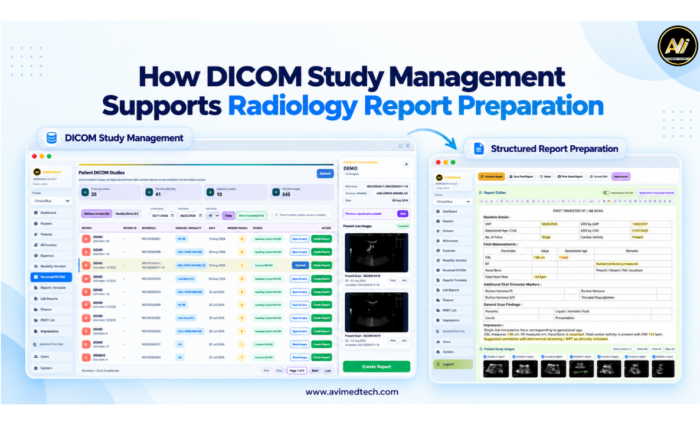
Before any findings are mentioned in a radiology report, the doctor has to verify the patient’s identity, access the right examination, look at the relevant images and check any existing previous records. If the information is kept in separate folders or in disconnected systems, putting together the report may require a lot of unnecessary searching and will involve repeated data entry.
The DICOM study management system enables these preparation steps to be incorporated into a more organised workflow by linking each imaging study with the information that the teams need in order to identify, access and report on the correct examination.
At AVI MedTech we assist diagnostic centres in linking study management, patient information, billing and the preparation of structured reports while ensuring that interpretation and final approval remain the doctors’ responsibility.
What Is DICOM Study Management?
DICOM is an acronym for Digital Imaging and Communications in Medicine and represents the international standard for medical images and related information; its information model usually structures imaging data in terms of patients, studies, series and individual instances, for example images.
In practice DICOM study management means accepting, sorting out and providing access to imaging studies so that members of staff and doctors can locate the right examination for reporting.
An organised study workflow helps teams check:
To which patient the study belongs.
- Which examination was carried out?
- Whether the necessary images are available.
- Whether the study is linked to the right patient record.
- Whether the examination is ready to be prepared for reporting.
They offer a more clear starting point for the reporting process.
What is it about study management in radiology that makes DICOM study management important?
A diagnostic centre carries out a number of related activities during the day. The receptionists look after patient information and billing, the technicians carry out the examinations, and the doctors examine the images and prepare the reports.
If the activities are interrupted, the staff might have to look for the studies themselves, reenter the information or have to keep asking whether the images are available. With the number of examinations rising, such interruptions can make it more difficult to coordinate daily operations.
By arranging the received studies together with the relevant patient information, DICOM study management enables a more connected radiology reporting workflow and helps the team to trace the relationship between the patient, the examination and the report.
How DICOM Study Management Supports Report Preparation
- Begin by verifying the patient and carrying out the examination.
The process of reporting starts by choosing the right study. With DICOM study management, patient identifiers and information about the examination become easier to review together with the received images. The staff then verify that the patient has been matched and fill in or correct any information that is missing before proceeding.
- Check the relevant study images and access them.
After the patient’s details and the examination have been checked, the following step is to verify that the images are available. If there is an organised study list, this helps the team to find the examination that has been received, and the viewing workflow that has been configured enables the doctors to access the images that are relevant for review.
- Use Available Study Information to Prepare Invoices
The patient information which is already included in the DICOM study can also be used for billing purposes. By using AVI MedTech’s DICOM-to-Invoice workflow, staff are able to retrieve the available details, check the fields that have been filled in, complete the billing information and then save the invoice. This helps to avoid having to type everything again and links the study that has been received with the patient and invoice records.
- Transition from carrying out a study review to preparing a structured report.
Once the appropriate study is available, the doctor can choose an examination-specific template and start to record the findings, measurements and impressions. The use of customizable templates, text shortcuts and voice-to-text facilities makes documentation easier, while the doctor then edits the content to match the patient’s examination.
- Where appropriate, review previous records.
When preparing a report, previous reports or examinations can be of use. If the relevant records are available and properly linked to the patient, the doctor should be able to look at them, check that they are the correct ones in terms of date and relevance, and make a comparison if suitable.
- Make sure the team stays connected over the entire process.
Carrying out patient verification up to the preparation of reports is the responsibility of receptionists, technicians and doctors. With a shared study workflow they are able to refer to the same examination and all the information connected with it, which in turn makes it easier to coordinate the availability of the images, billing and reporting without having to carry out repeated follow-ups.
- Finish the process with a doctor’s review and approval.
Before being authorised, the doctor examines the patient and checks the examination details, looks over the findings and impression, and makes any required amendments. The system provides support for study preparation, but clinical interpretation and the final approval of the report are still within the doctor’s control.
A Practical Study-to-Report Workflow
Although each centre’s setup may differ, an organised workflow can include the following steps:
Get the DICOM study via the integration that has been configured.
2. Verify the details about the patient and the examination related to the study.
3. Make sure that the image is available and then access the examination.
4. Get and check available patient details for making invoices, if possible.
5. Choose the correct reporting template and record the findings.
When it is appropriate, look over the existing previous records.
7. The author should review the report, authorise it and then deliver it using the centre’s reporting procedure.
The specific sequence varies according to the imaging equipment, the software configuration and the operational requirements of the centre.
How AVI MedTech Supports a Connected Reporting Workflow
The structured reporting software produced by AVI MedTech combines DICOM study management with patient information, invoice details and the preparation of reports.
Through this connected workspace, teams can:
•You can view the DICOM studies together with the related patient and invoice information.
• Verify that the image is available before carrying on with report creation.
• Retrieve the patient details that are available for use when preparing the invoice and check them before saving.
•Make reports with templates that you can change for each exam.
• Use text shortcuts and voice input to cut down on the need for repeated typing.
• Look over the existing previous records and the relevant supporting images.
• Ensure that the review of the report and its authorisation remain under the control of the doctor.
The tools enable doctors to carry out the various tasks involved in everyday reporting at the same time as allowing them to tailor the report to each patient’s specific findings.
Frequently Asked Questions
What counts as a DICOM study?
A DICOM study is a structured set of imaging information connected with an examination and it can include several series and images along with the patient and study details.
What role does DICOM study management play in radiology reporting?
It enables teams to find the right examination, check the patient details that are available and gain access to the relevant images before preparing the report. If it is used with reporting tools, it offers a more structured route from the time the study is received to the time the report is prepared.
Can patient details be fetched from DICOM studies?
Certainly, provided that the software and the integration permit it. Although the detailed information can be obtained from the source study, the staff should check the information and fill in any missing details before using it in the patients’ or billing records.
What does AVI MedTech’s DICOM-to-Invoice workflow entail?
Staff are able to choose a DICOM study that has been received, obtain the patient details that are available, look at this information, fill in the billing fields and then produce an invoice. This in turn helps to avoid the need to reenter information which is already contained in the study.
Is the management of DICOM studies equivalent to structured reporting?
They have different roles in a connected workflow; DICOM study management is used for organising and accessing imaging studies, while structured reporting enables doctors to record their findings, measurements and impressions using a structured report format.
While preparing a new report, can doctors compare the previous reports?
When previous records are available and have been correctly linked to the patient, they may be looked at while the report is being prepared. The doctor then decides if those records are relevant and whether a comparison should be made.
Shall the software be compatible with every imaging machine?
The degree of compatibility will depend on the equipment’s DICOM capabilities and the integration that has been configured. During both the demonstration and the setup phase, your centre should check the workflow that it intends to use for receiving and viewing studies.
Does DICOM study management automatically read images?
The DICOM study management system is in charge of organising studies and provides support for access to information. In the workflow mentioned here the doctor interprets the images, prepares or alters the findings and then approves the final report.
Build a More Organised Radiology Reporting Workflow
Effective reporting starts with having access to the right patient information and examination details. By using DICOM study management, these essential elements can be organised so that the team can make a smoother transition from receiving the images to preparing the report.
AVI MedTech links its various preparation steps to adjustable reporting tools, as well as to patient and billing operations and to authorisation that is controlled by the doctor.
Arrange a free demonstration with AVI MedTech to find out how DICOM study management can be incorporated into your centre’s reporting workflow.
For more information, please visit www.avimedtech.com.